
One recipe, three systems: keeping an ERP, a POS, and CalcMenu in sync
Large multi-outlet operations run their finances on an ERP, their tills on a separate POS platform, and their recipes, allergens, and food cost in CalcMenu. Here's the general pattern for keeping all three from drifting apart — and why the interface has to be built to be extended, not just built once.
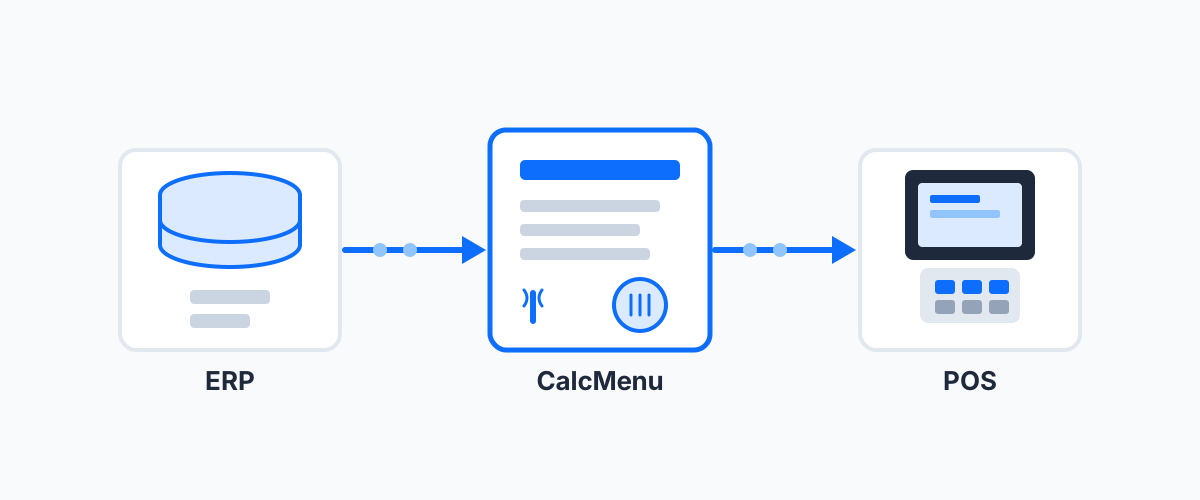
Three systems, one set of facts
A large multi-outlet food service operation — a resort with several restaurants and bars, a stadium with concession stands, a cruise line with a dozen dining venues — typically runs on three separate systems that all need to agree on the same underlying facts. An ERP (often something like JD Edwards) owns purchasing: item codes, units of measure, and pricing for everything bought from suppliers. A POS platform (often something like Oracle Simphony) owns the till: what’s sold, at what price, in which outlet. And a recipe management system like CalcMenu owns the food itself: recipes, costing, nutrition, and allergens.
None of those three systems is wrong to be the source of truth for what it owns. The problem shows up when nobody owns the relationship between them, and someone ends up manually re-keying the same merchandise item into two or three places, with the inevitable drift that follows.
What the interface actually needs to do
It’s tempting to think of “an ERP interface” as a single pipe. In practice it needs to solve two distinct problems, in two different directions:
Bringing purchasing data in. The ERP is where purchased articles live — item codes, units, and pricing. An interface that reads that export and matches it to CalcMenu’s article records means a kitchen team never retypes purchasing data that already exists elsewhere; it flows in once and drives the cost, nutrient, and allergen figures on every recipe that uses it. A common wrinkle: ERPs often track a base unit (kilograms, liters) separately from a purchasing unit (each, case, tray) with its own price — the interface has to carry both, and the ratio between them, or a recipe costed by weight can’t be reconciled against stock bought by the case.
Sending recipe cost out. On the POS side, what the till actually needs isn’t the recipe as CalcMenu sees it — it’s cost per portion actually sold, tied to a specific outlet. That’s a different number from cost-per-recipe-yield the moment batch recipes are involved, so the export logic has to be built for the POS’s definition of a portion, not CalcMenu’s.
For operations with multiple linked outlets sharing a kitchen or a warehouse, there’s often a third piece: keeping the ERP’s list of transferable products in sync with what’s actually still active in the recipe system, so a discontinued item doesn’t linger as a valid option for moving stock between locations.
Why it has to be built to be extended
This kind of interface is never really “done.” Unit-of-measure conventions get standardized after the fact. POS export logic gets corrected once someone notices it was reporting the wrong cost basis. Discontinued products need their own handling so they stop appearing where they shouldn’t. And the recipe system itself eventually migrates to a new platform, which means the interface has to migrate with it rather than getting rebuilt from scratch. An interface designed as a single rigid pipe breaks at the first of these; one designed with a clear mapping layer between systems absorbs each change as a small, scoped update.
The advantage, concretely
Done well, this kind of integration removes a specific, recurring cost rather than adding a feature for its own sake:
- No duplicate encoding of merchandise data. Item codes, units, and pricing exist once, in the ERP, and reach recipe costing automatically.
- The POS reflects real food cost, not a stale estimate. Menu engineering and profitability analysis work from current cost-per-portion numbers instead of a spreadsheet someone updated last quarter.
- Inter-outlet transfers don’t rely on someone remembering to update the ERP by hand.
- The integration survives change instead of breaking under it — unit-of-measure redesigns, POS export corrections, and platform migrations on the recipe-management side all become incremental updates rather than renegotiated projects.
This pattern shows up anywhere a multi-outlet operation runs food service on top of an enterprise back office: resorts, cruise lines, airline catering, and multi-brand hotel groups all hit it once they cross a handful of outlets. See our POS systems integrations for how CalcMenu’s integration layer applies the same principle across different ERP and POS platforms.
Running food service across multiple outlets on top of an ERP and POS estate, and tired of re-keying the same merchandise data twice? Book a 15-minute call: Schedule here.
Related sectors
Comments
Comments coming soon.